

Why Your Blog Needs More Than Google Analytics
Google Analytics 4 has left thousands of bloggers frustrated. The interface feels clunky, custom reports are buried three menus deep, and tracking attribution across multiple content pieces feels like solving a puzzle with missing pieces. Yet here’s the truth: GA4 isn’t the problem—it’s just one tool in what should be a much larger stack.
The most successful blogs in 2026 aren’t relying on a single analytics platform. Instead, they’re building integrated stacks that combine web analytics, SEO tracking, user experience insights, and content-specific metrics. This approach gives you the complete picture: not just how many people visited your blog, but what they actually did, which content converts, and where they’re getting stuck.
The challenge? Most guides throw 15 tools at you and call it a day. This guide does something different: we’ll show you how to build a future-proof analytics stack that grows with your blog, from day one through 100K monthly visitors and beyond.

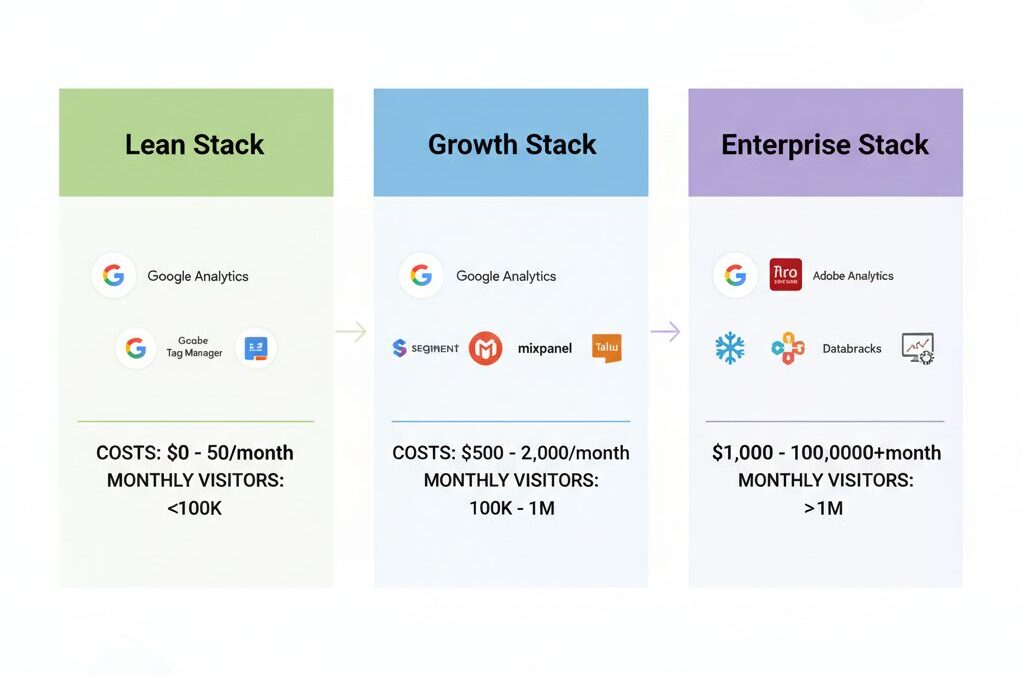
Stage 1: The Lean Setup (New Blogs, Under 10K Monthly Visitors)
When you’re starting out, complexity kills momentum. You need visibility without overwhelm. Here’s the minimal viable stack:
Foundation: Privacy-First Web Analytics
Matomo is gaining serious traction among privacy-conscious bloggers in 2026. Unlike Google Analytics, Matomo gives you full data ownership—you can host it yourself or use their cloud version starting at around $19/month. You get heatmaps, session recordings, and conversion tracking without the GDPR headaches that plague GA4.
Alternatively, if you’re already in the Google ecosystem and GA4’s learning curve feels manageable, stick with it. The free tier handles everything you need at this stage: traffic sources, user behavior, basic conversion tracking, and audience demographics.
SEO Layer: Ahrefs or SEMrush Free Tiers
You need to understand which of your posts rank and why. Ahrefs’ free tier gives you keyword research and backlink monitoring. SEMrush’s free version provides rank tracking for up to 5 keywords. Pick one and commit to it. At this stage, you’re building the habit of checking search performance weekly.
Content Performance: Hotjar Heatmaps
Hotjar’s free plan ($0) includes heatmaps and session recordings for one website. This single tool answers critical questions: Are readers scrolling past your CTA? Where do they drop off? Which sections get the most attention? At 10K monthly visitors, you’ll hit Hotjar’s free limits (100 sessions/month), but by then you’ll know if upgrading to their Growth plan ($99/month) makes sense.
Total monthly cost: $0-50 if you’re scrappy; $99-150 if you add Hotjar paid.
Stage 2: The Growth Stack (10K-100K Monthly Visitors)
As your blog gains traction, single-tool gaps become obvious. You need deeper product analytics and better attribution.
Upgrade Your Web Analytics: Amplitude or Mixpanel
This is where Amplitude and Mixpanel enter the picture. Both platforms excel at behavioral analytics—understanding not just that someone visited, but what sequence of actions they took. Amplitude’s free starter plan is genuinely useful; their Growth plan runs $995/month. Mixpanel positions itself similarly, with freemium and enterprise tiers.
For blogs specifically, Amplitude’s strength is handling complex user journeys. You can track: reader visits article → reads 80% → clicks internal link → subscribes to email. That journey data is impossible to get from GA4 without custom events and hours of setup.
Session Replay at Scale: LogRocket or Fullstory
At 50K monthly visitors, you need to see exactly what’s breaking the reader experience. LogRocket ($99/month starter) combines session replay with error tracking—perfect for catching when your blog’s comment system breaks or a button doesn’t work. Fullstory ($500+/month) is more enterprise-focused but offers pixel-perfect replays and AI-driven friction detection.
For most growing blogs, LogRocket’s sweet spot is the Starter plan at $99/month, which includes 1,000 sessions/month and basic error tracking.
Content Analytics: Add Segment or Rudderstack
Now you’re collecting data from multiple tools (Amplitude, LogRocket, Google Analytics). Segment ($120/month starter) acts as a data hub, collecting events once and sending them everywhere. This eliminates double-tracking and ensures your data stays consistent across platforms.
Total monthly cost: $400-800 depending on your choices.
Stage 3: The Enterprise Stack (100K+ Monthly Visitors, Media Properties)
High-traffic blogs and media brands need attribution, predictive analytics, and integration with their entire business system.
Unified Analytics Platform: Pendo or GainsightPX
Pendo positions itself as an all-in-one “SXM platform”—combining analytics, session replay, in-app guidance, and feedback collection. Pricing is custom (enterprise-only), but Pendo’s integrated approach eliminates tool sprawl. You’re not juggling five dashboards; you’re working in one system that connects analytics to action.

GainsightPX takes a different angle: it’s built specifically for product-led growth and customer success alignment. If your blog feeds into a SaaS product (common for B2B blogs), GainsightPX’s $500+/month cost makes sense because it connects content consumption to product adoption.
Advanced BI: Tableau or Power BI
At this scale, you need custom dashboards that connect blog analytics to business outcomes: revenue per article, content ROI, reader lifetime value. Tableau ($70/user/month) and Microsoft Power BI ($10-20/user/month) both handle this, but Power BI’s lower cost and Microsoft integration make it the default choice for enterprise blogs.
Predictive Analytics: Qlik or ThoughtSpot
Qlik Sense ($30-50/user/month) uses AI to surface insights automatically. Instead of manually checking dashboards, Qlik tells you “This article underperformed by 40% compared to similar pieces” or “Reader engagement is dropping on Thursdays.” ThoughtSpot ($40+/user/month) offers similar AI-driven insights with a focus on natural language queries.
Total monthly cost: $2,000-5,000+ for a full enterprise stack with multiple users.
The Real Differentiator: Integration and Workflow
Owning five tools means nothing if they don’t talk to each other. Here’s what separates successful blog analytics stacks from expensive tool graveyards:
Automation: Set up Zapier workflows that trigger when metrics hit thresholds. If an article drops below 10% scroll depth, automatically flag it for revision. If a piece hits 50K views, push it to your email marketing platform.
Single Source of Truth: Use Segment or Rudderstack to ensure data consistency. Don’t let GA4 and Amplitude report different user counts.
Weekly Rituals: Schedule 30 minutes every Monday to review: top-performing content, traffic sources, user friction points, and SEO opportunities. This discipline beats sporadic deep dives.
2026 Trends Reshaping Blog Analytics
Privacy-First is Non-Negotiable: GDPR, CCPA, and similar regulations have made privacy-aware tools like Matomo and Plausible (€9/month) serious competitors to Google Analytics. Readers increasingly block Google’s tracking, so your analytics are becoming incomplete anyway.
AI Insights Are Becoming Standard: Platforms like Amplitude, Qlik, and ThoughtSpot now include AI that surfaces anomalies and trends automatically. You’re no longer digging through dashboards; the tool tells you what changed.
Attribution is Finally Solvable: First-party data and cookieless tracking mean you can’t rely on third-party cookies anymore. Tools like Amplitude and Mixpanel excel at first-party attribution, showing which content pieces actually drive conversions.
Your Action Plan: Start Today
Week 1: Set up Matomo (free tier) or confirm GA4 is tracking properly. Add one heatmap tool (Hotjar free or LogRocket trial).
Week 2: Define your key metrics: What does success look like for your blog? (Pageviews, email signups, product conversions, time-on-page?) Build one dashboard in your chosen platform showing these metrics.
Week 3: Audit your top 10 articles. Which ones have high traffic but low engagement? Which ones convert best? Start rewriting underperformers based on heatmap data.
Month 2+: As you grow, add tools strategically. Don’t buy because of FOMO; buy because you’ve identified a specific gap in your current stack.

The blogs winning in 2026 aren’t using the most tools—they’re using the right tools, integrated intelligently, with a clear workflow connecting data to action. Start lean, measure everything, and scale your stack as your blog grows.

Unlock Full Article
Watch a quick video to get instant access.

Social Media